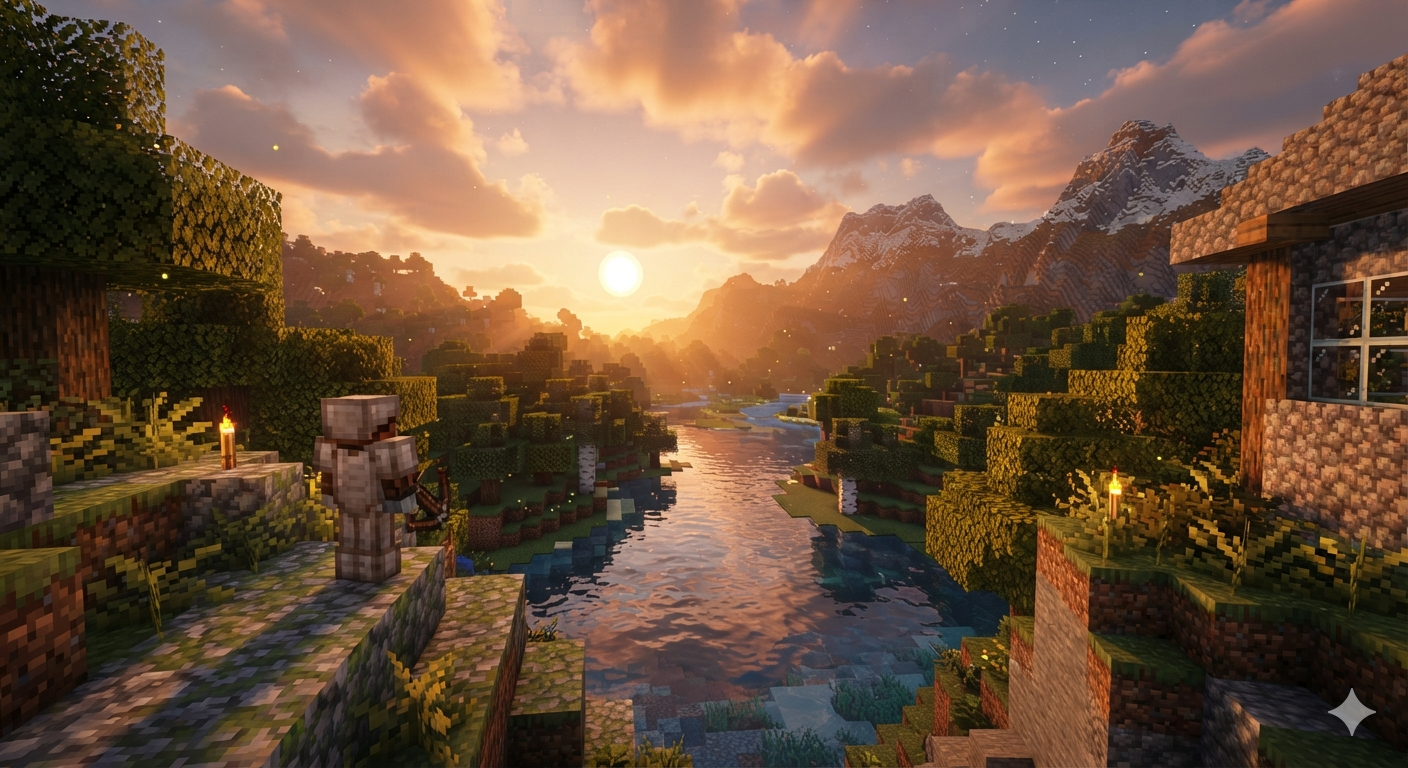
Minecraft Shaders That Make the Game Realistic
Minecraft’s signature blocky graphics have become one of the most recognizable art styles in gaming history. Despite its simple visuals, the game has remained incredibly popular because of its limitless creativity and engaging gameplay. However, many players eventually wonder what Minecraft would look like with modern graphics, realistic lighting, dynamic shadows, and lifelike water.
That’s where Minecraft shaders come in.
Shader packs transform the appearance of Minecraft without changing its core gameplay. They introduce advanced lighting effects, realistic reflections, volumetric clouds, waving grass, detailed water, ambient occlusion, and cinematic skies that make the world feel alive.
Whether you’re building a medieval kingdom, exploring vast mountain ranges, surviving in dense forests, or recording content for YouTube, the right shader pack can completely redefine your Minecraft experience.
In this guide, we’ll explore the best Minecraft shaders that make the game realistic, explain their strengths, discuss hardware requirements, and help you choose the perfect shader for your PC.
What Are Minecraft Shaders?
Minecraft shaders are graphical modifications that change how the game renders lighting, shadows, reflections, weather, and environmental effects.
Instead of replacing textures, shaders improve the game’s rendering engine by adding features such as:
- Realistic sunlight
- Dynamic shadows
- Water reflections
- Better fog
- Moving leaves
- Waving crops
- Improved clouds
- Bloom lighting
- Ambient lighting
- Motion blur (optional)
- Volumetric lighting
Think of shaders as giving Minecraft a next-generation graphics upgrade while preserving the game’s iconic block-based design.
Why Use Shaders?
Many players install shaders for one simple reason—they make Minecraft look breathtaking.
A simple wooden cabin beside a river suddenly becomes a peaceful lakeside retreat illuminated by a glowing sunset. Dense forests become atmospheric environments with sunlight filtering through leaves, while caves feel darker and more immersive.
Benefits include:
- More immersive gameplay
- Beautiful screenshots
- Better YouTube videos
- Cinematic gameplay
- Enhanced survival worlds
- Improved exploration
- Realistic weather effects
Even familiar biomes feel entirely new with a quality shader pack installed.
1. BSL Shaders
Best For: Balanced realism and performance
BSL Shaders have become one of the most popular shader packs because they offer stunning visuals without requiring an ultra-powerful gaming PC.
Highlights include:
- Warm lighting
- Soft shadows
- Beautiful sunsets
- Dynamic clouds
- Realistic water
- Colorful skies
- Smooth reflections
- Waving vegetation
Unlike some heavy shader packs, BSL works well on mid-range hardware while still delivering excellent image quality.
Pros
- Excellent optimization
- Highly customizable
- Vibrant colors
- Great for survival gameplay
Cons
- Not the most photorealistic option
2. Complementary Shaders
Best For: Everyday gameplay
Complementary Shaders are built upon BSL but include numerous improvements and additional customization options.
Many Minecraft players consider them the best all-around shader because they balance:
- Performance
- Visual quality
- Compatibility
- Stability
Features include:
- Better water reflections
- Dynamic weather
- Enhanced caves
- Better Nether lighting
- Improved End dimension visuals
- Adjustable brightness
Complementary Shaders work exceptionally well with modern Minecraft versions.
3. SEUS (Sonic Ether’s Unbelievable Shaders)
Best For: Photorealistic graphics
SEUS is legendary in the Minecraft community.
For years, it has pushed Minecraft’s graphics beyond what many believed possible.
Its signature features include:
- Real-time shadows
- Volumetric lighting
- Incredible sunsets
- High-quality reflections
- Dynamic weather
- Realistic water
- Soft global illumination
SEUS PTGI even introduces ray-tracing-inspired lighting for supported systems, producing remarkably realistic scenes.
4. Sildur’s Vibrant Shaders
Best For: Performance across different PCs
Sildur’s Vibrant Shaders come in multiple versions:
- Lite
- Medium
- High
- Extreme
This flexibility makes the pack suitable for a wide range of hardware.
Visual improvements include:
- Better clouds
- Improved shadows
- Bloom
- Enhanced reflections
- Dynamic lighting
- Water animation
Players with older graphics cards often choose the Lite version for smoother gameplay.
5. Continuum Shaders
Best For: Ultra-realistic screenshots
Continuum is designed for players seeking the highest level of realism.
Features include:
- Photorealistic lighting
- Physically accurate shadows
- Cinematic skies
- Advanced reflections
- High-quality water
- Atmospheric fog
The results are spectacular, but the shader demands a powerful gaming PC.
If you’re creating cinematic videos or high-resolution screenshots, Continuum is one of the best choices available.
6. Nostalgia Shaders
As the name suggests, Nostalgia Shaders recreate the classic appearance of older Minecraft shader packs while introducing modern lighting technology.
Features include:
- Warm colors
- Retro atmosphere
- Gentle lighting
- Improved weather
- Soft shadows
It strikes a great balance between old-school charm and contemporary graphics.
7. AstraLex Shaders
AstraLex is one of the most visually impressive shader packs available today.
It focuses heavily on cinematic effects:
- God rays
- Volumetric fog
- Dynamic clouds
- Glowing lava
- Weather improvements
- Better nighttime lighting
The shader pack creates dramatic scenes perfect for fantasy builds and adventure maps.
8. Chocapic13 Shaders
One of the oldest and most respected shader projects, Chocapic13 remains a favorite thanks to its lightweight design.
Advantages include:
- Smooth performance
- Multiple presets
- Great compatibility
- Attractive lighting
It’s an excellent option for players who want better graphics without sacrificing too many frames per second.
9. ProjectLUMA
ProjectLUMA builds upon the foundations of KUDA shaders while introducing enhanced realism.
Visual improvements include:
- Better lighting
- Improved shadows
- Water enhancements
- Vibrant colors
- Performance optimization
It works especially well for long survival sessions where consistent frame rates matter.
10. MakeUp Ultra Fast Shaders
Not everyone owns a high-end gaming PC.
MakeUp Ultra Fast focuses on delivering beautiful visuals while remaining accessible to low-end and mid-range systems.
Features include:
- Optimized rendering
- Adjustable effects
- Good FPS
- Beautiful skies
- Nice reflections
This shader is ideal for laptops and entry-level gaming computers.
Comparing the Best Realistic Minecraft Shaders
| Shader Pack | Realism | Performance | Best For |
|---|---|---|---|
| BSL | ★★★★☆ | ★★★★★ | Everyday gameplay |
| Complementary | ★★★★★ | ★★★★★ | Balanced visuals |
| SEUS | ★★★★★ | ★★★☆☆ | Realistic lighting |
| Continuum | ★★★★★ | ★★☆☆☆ | Cinematic builds |
| Sildur’s Vibrant | ★★★★☆ | ★★★★★ | All PC types |
| AstraLex | ★★★★★ | ★★★☆☆ | Dramatic environments |
| Nostalgia | ★★★★☆ | ★★★★☆ | Classic Minecraft feel |
| Chocapic13 | ★★★★☆ | ★★★★★ | Older PCs |
| ProjectLUMA | ★★★★☆ | ★★★★☆ | Survival mode |
| MakeUp Ultra Fast | ★★★☆☆ | ★★★★★ | Budget hardware |
How to Install Minecraft Shaders
Installing shaders is relatively simple, especially for Minecraft Java Edition.
Step 1: Install a Shader Loader
Most shader packs require Iris Shaders or OptiFine.
Step 2: Download a Shader Pack
Choose your preferred shader and download the latest compatible version.
Step 3: Open the Shader Folder
Launch Minecraft and navigate to:
Options → Video Settings → Shaders → Shader Packs Folder
Step 4: Copy the Shader File
Move the downloaded ZIP file into the shader folder. Do not extract it unless instructed by the shader’s documentation.
Step 5: Activate the Shader
Return to Minecraft, select the shader from the list, and apply it. Your world will reload with the new visual effects.
Recommended PC Specifications
Your experience depends heavily on your hardware.
Entry-Level PC
- Intel Core i3 / Ryzen 3
- GTX 1050
- 8 GB RAM
Recommended shaders:
- MakeUp Ultra Fast
- Chocapic13 Lite
- Sildur’s Lite
Mid-Range PC
- Ryzen 5
- Intel Core i5
- RTX 3060
- RX 6700 XT
- 16 GB RAM
Recommended shaders:
- BSL
- Complementary
- ProjectLUMA
- AstraLex (Medium settings)
High-End PC
- Intel Core i7/i9
- Ryzen 7/9
- RTX 4080 or RTX 4090
- 32 GB RAM
Recommended shaders:
- Continuum
- SEUS PTGI
- AstraLex Extreme
Tips for Better Performance
Realistic shaders can be demanding. Here are some ways to improve performance:
- Lower render distance from 24 to 12–16 chunks.
- Reduce shadow quality if the shader allows.
- Disable motion blur if you don’t need it.
- Turn down volumetric cloud quality.
- Allocate enough RAM to Minecraft (typically 4–8 GB for modded setups).
- Close background applications before playing.
- Keep your graphics drivers up to date.
Small adjustments can significantly increase FPS without greatly affecting visual quality.
Can You Use Shaders with Texture Packs?
Yes. In fact, shaders and texture packs often complement each other.
For example:
- High-resolution resource packs enhance block detail.
- PBR (Physically Based Rendering) texture packs add depth through normal and specular maps.
- Shaders then apply realistic lighting and reflections, making those textures appear even more lifelike.
Be aware that combining high-resolution textures with demanding shaders increases hardware requirements.
Java Edition vs. Bedrock Edition
Shaders are most commonly associated with Minecraft Java Edition, where community-created shader packs are abundant.
For Minecraft Bedrock Edition, graphics enhancements are more limited due to engine differences. Some render packs and RTX-enabled worlds (on supported NVIDIA RTX hardware) can improve visuals, but compatibility and features vary.
If your primary goal is maximum visual realism with the widest choice of shader packs, Java Edition remains the preferred platform.
Frequently Asked Questions
What is the most realistic Minecraft shader?
Many players consider SEUS PTGI and Continuum among the most realistic due to their advanced lighting, reflections, and atmospheric effects.
Which shader offers the best balance of visuals and performance?
Complementary Shaders and BSL Shaders are widely regarded as the best balance between image quality and frame rate.
Do shaders work on all computers?
Yes, but performance depends on your hardware. Lightweight options such as MakeUp Ultra Fast and Sildur’s Lite are designed for lower-end systems, while more demanding packs like Continuum require powerful GPUs.
Do shaders affect gameplay?
No. Shaders change only the visual presentation of Minecraft. They do not alter game mechanics, crafting, combat, or world generation.
Can I use shaders in multiplayer?
Yes. As long as the server permits shader-compatible clients (which most do), shaders are a client-side visual enhancement and do not affect other players.
Final Thoughts
Minecraft’s enduring appeal lies in its creativity and freedom, but the right shader pack can elevate that experience to an entirely new level. From tranquil rivers reflecting a colorful sunset to forests filled with dynamic shadows and volumetric light, realistic shaders transform familiar worlds into breathtaking landscapes.
If you’re looking for the best all-around experience, Complementary Shaders and BSL Shaders are excellent choices for most players. Those with powerful gaming PCs can push realism even further with SEUS PTGI or Continuum, while users on modest hardware can still enjoy enhanced visuals with Sildur’s Vibrant, Chocapic13, or MakeUp Ultra Fast.
Ultimately, the “best” shader depends on your computer, your preferred visual style, and how you enjoy playing Minecraft. Experiment with different packs, fine-tune their settings, and you’ll discover a version of Minecraft that feels more immersive, atmospheric, and visually stunning than ever before.